

"How is GuardDo Pixel different from GrapheneOS?" This is one of the questions we hear most often from customers, partners, and followers. It comes up in private messages, video comments, and consultations before a purchase. Rather than answering it separately each time, we decided to publish one detailed article that compares the two approaches to smartphone security honestly, point by point.
In Brief: The Key Takeaways
GrapheneOS is an open-source, security-focused Android operating system for Google Pixel smartphones. It is developed by a nonprofit project focused on strengthening the system’s security. GuardDo Pixel is a ready-to-use secure Google Pixel smartphone running its own GuardDoOS firmware. It includes practical privacy features: a hidden second space, several emergency data-destruction scenarios, built-in tools for bypassing blocks, SIM masking, an anonymous app store, and personal technical support.
The main advantages of GuardDo Pixel over GrapheneOS:
- An undetectable “gray” space, accessible directly from the lock screen with a separate password or fingerprint.
- Six emergency data-deletion scenarios, including deletion by SMS sent from any phone.
- Built-in network protection: two VPN servers, DPI bypass, a secure Telegram proxy, and location spoofing.
- Two SIM cards in two separate spaces, with SIM information hidden from apps.
- An anonymous app store that does not require a Google account and checks every app for threats and trackers.
- Protection against third parties resetting the phone through Recovery Mode.
- Personal support in English, Spanish, German, Russian, French, and Arabic, covering setup, daily use, and custom functionality.
What Is GrapheneOS?
GrapheneOS is one of the best-known secure mobile operating systems. It runs on Google Pixel smartphones, does not include Google services by default, and offers Google Play in an isolated sandbox (Sandboxed Google Play). Security professionals respect the project for its extensive work on hardening Android.
GrapheneOS is primarily an operating system, however, not a ready-to-use, turnkey solution. Users install the firmware themselves, configure profiles, networking, and apps themselves, and seek help from the community when questions arise. For many people, this is where the difference between a “secure system” and “a secure phone that is comfortable to use every day” becomes clear.
What Is GuardDo Pixel?
GuardDo Pixel is a Google Pixel smartphone running GuardDo’s own GuardDoOS firmware. It was developed by a team originally from Russia; GuardDo’s parent company is registered in the UAE (ORANGEPEAK SOFTWARE PROVIDERS – FZCO) and specializes in hardware cybersecurity. Alongside smartphones, GuardDo makes encrypted USB drives, VPN routers, Samurai physical data-destruction devices, and storage-device shredders. It also installs specialized firmware on laptops and PCs, provides information-security consulting, and develops custom security products.
We designed GuardDo Pixel around real-world threats: a phone being seized, someone being forced to unlock it, attempts to extract data with forensic equipment, and network blocking or surveillance. That is why its key protections work out of the box, while our team helps with setup and supports customers after purchase.
GuardDo Pixel vs GrapheneOS: Comparison Table
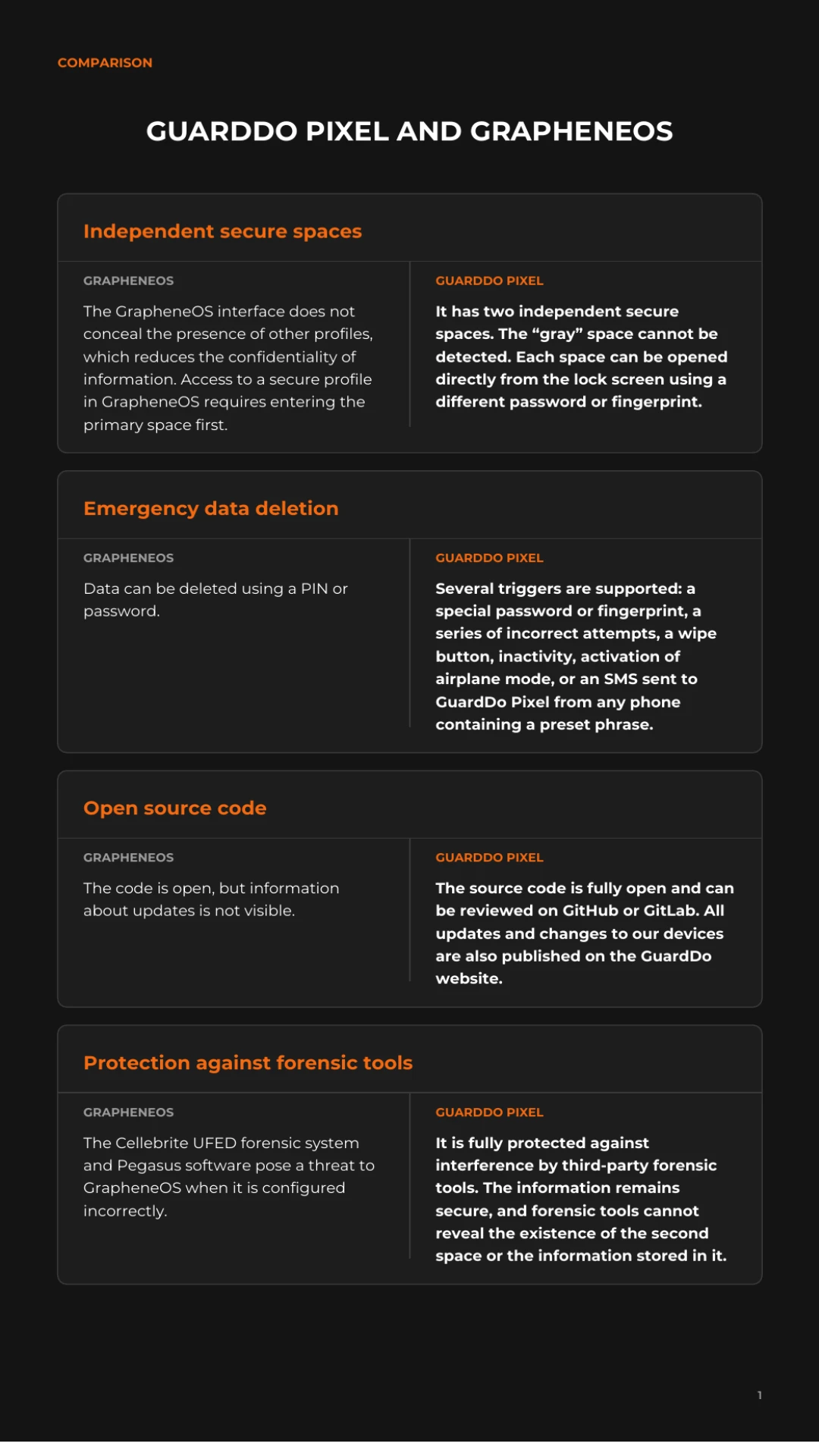
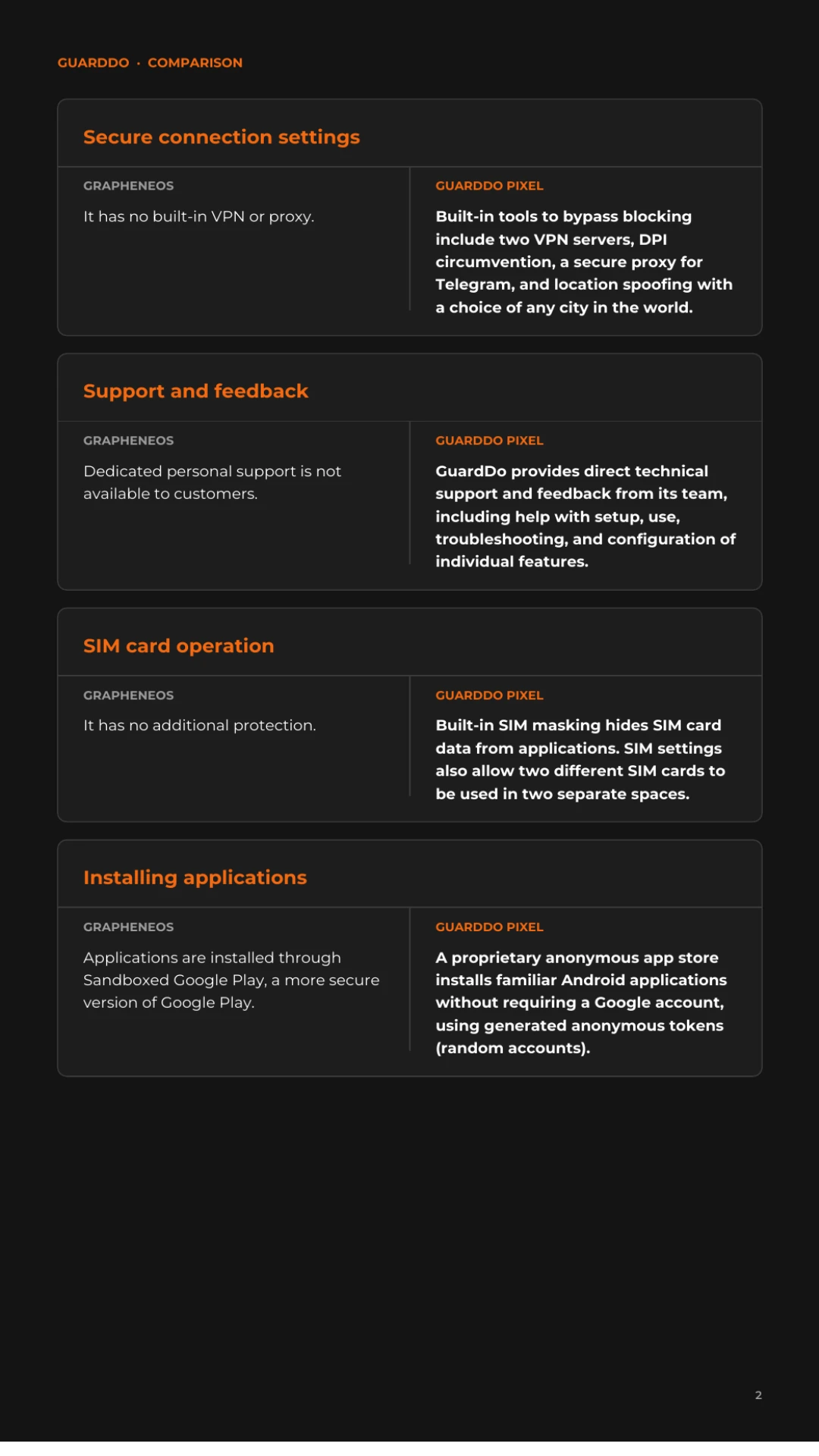
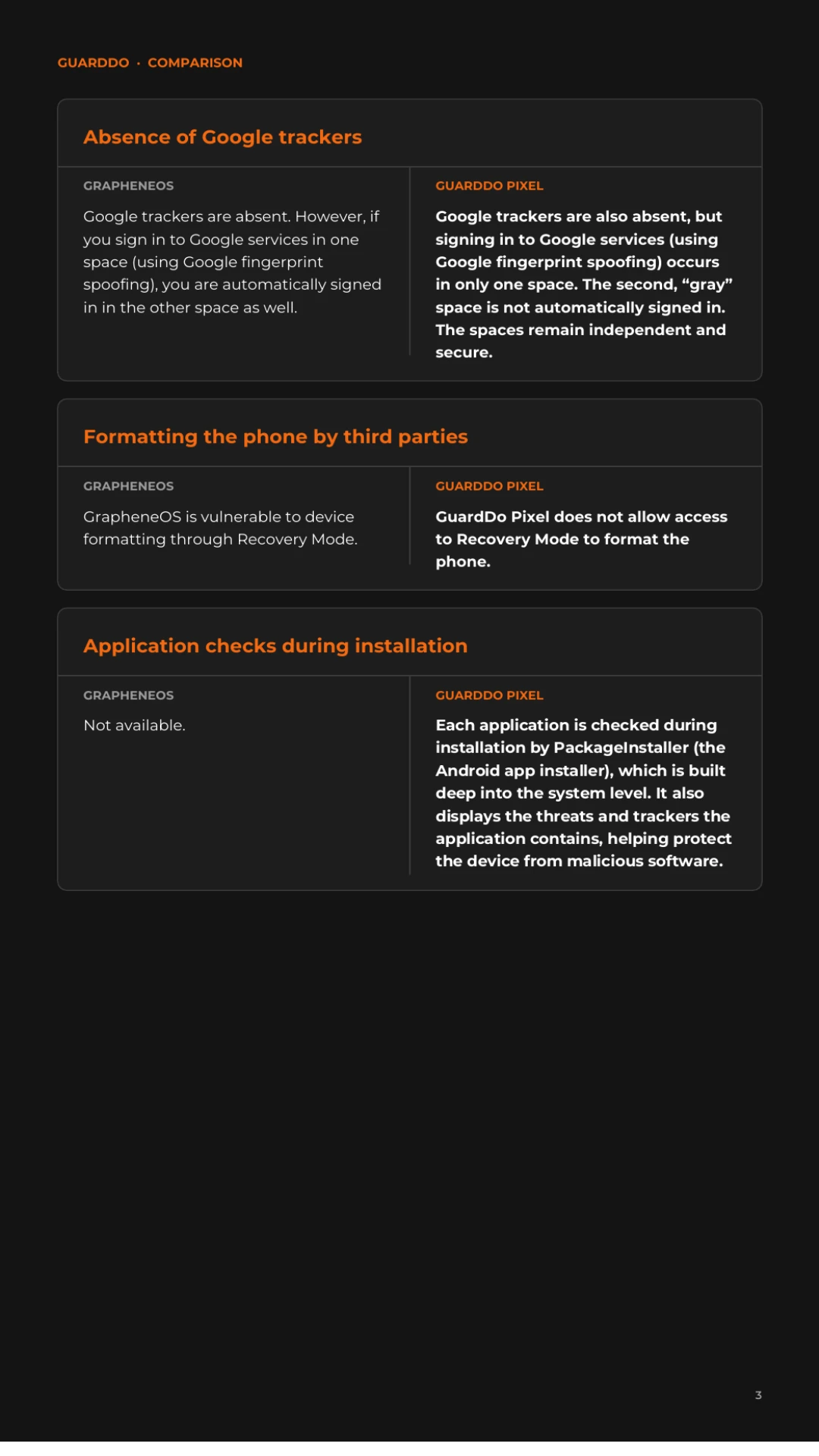
A Closer Look at Each Criterion
1. Hidden Space: The Main Difference with GuardDo Pixel
GrapheneOS has user profiles, but their existence is not hidden: the interface shows that other users are present on the device. Moreover, to access a second profile, you must first enter the primary, “white” space. If someone is forced to unlock a phone, the very existence of a second profile becomes a vulnerability.
GuardDo Pixel has two completely independent secure spaces. The “gray” space cannot be detected in the interface or settings. Each space can be opened directly from the lock screen: one password or fingerprint opens the ordinary space, another opens the hidden one. To an outsider, the phone looks like an ordinary smartphone with a single user.
2. Emergency Data Deletion: Six Scenarios Instead of One
GrapheneOS has a useful feature for deleting data with a special PIN or password. It is a good mechanism, but it works in only one scenario: when you enter the code yourself.
GuardDo Pixel supports several independent emergency data-destruction scenarios:
- entering a special password or using a special fingerprint;
- a series of incorrect unlock attempts;
- a destruction button;
- extended device inactivity;
- turning on airplane mode;
- an SMS containing a predefined phrase, sent to GuardDo Pixel from any phone.
The last scenario is especially important: if the phone is lost or seized, data can be destroyed remotely without physical access to the device.
3. Protection Against Forensic Tools
Forensic tools such as Cellebrite UFED are designed to extract data from seized smartphones. GrapheneOS resists such attacks well, but the final level of protection largely depends on how correctly users configure the system.
GuardDo Pixel is designed to protect data without complex manual setup. Forensic tools cannot reveal the presence of the second space on the phone (unlike GrapheneOS), or the information stored in it. That is crucial when it is important not only to keep data private, but also to hide the fact that it exists.
4. VPN, DPI Bypass, and Location Spoofing Out of the Box
GrapheneOS does not have a built-in VPN or proxy: users need to choose, install, and configure third-party solutions themselves.
GuardDo Pixel includes a complete set of built-in network protections:
- two VPN servers;
- DPI (deep packet inspection) bypass;
- a secure proxy for Telegram;
- location spoofing with a choice of any city worldwide.
All of this works as soon as the phone is turned on, without searching for apps or configuring them manually.
5. SIM Protection and Two SIM Cards in Two Spaces
The SIM card is one of the most underestimated sources of data leakage: apps can read information about the number, carrier, and identifiers. GrapheneOS has no additional SIM-card protection.
GuardDo Pixel includes SIM masking that hides its data from apps. It is also possible to use two different SIM cards in two different spaces. This allows complete separation of work and personal life, for example, or public and confidential numbers.
6. Anonymous App Store with Threat Checks
On GrapheneOS, apps are usually installed through Sandboxed Google Play, an isolated and more secure version of the familiar Google Play. But it still requires a Google account, and there is no built-in app check for trackers.
GuardDo Pixel has its own anonymous app store. Familiar Android apps are installed without a mandatory Google-account connection: the store generates anonymous tokens, or random accounts. It also checks every app during installation and shows which threats and trackers were found. You can see what you are installing in advance and protect the device from malware.
7. Google Services Without Trackers or Cross-Space Access
Neither system has Google trackers. The difference is how they work with Google services when those services are needed.
On GuardDo Pixel, signing in to Google services (using Google signature spoofing) happens in only one space. Automatic sign-in does not take place in the second, “gray” space. The spaces remain independent, and a Google account does not link them together in any way.
8. Protection Against Resetting via Recovery Mode
On GrapheneOS, as on most Android smartphones, an outsider can enter Recovery Mode and format the device. This can, for example, prepare a stolen phone for resale or destroy traces of interference.
GuardDo Pixel does not allow entry into Recovery Mode to format the phone. The device remains under its owner’s control.
9. Open Source and Transparent Updates
GrapheneOS has open-source code, and its changelog is published in English on the project website.
GuardDo Pixel’s source code is fully open and available on GitHub and GitLab. We publish all updates and changes to our devices on the GuardDo website, so anyone can check exactly what has changed on their phone.
10. Stability and Code Fixes
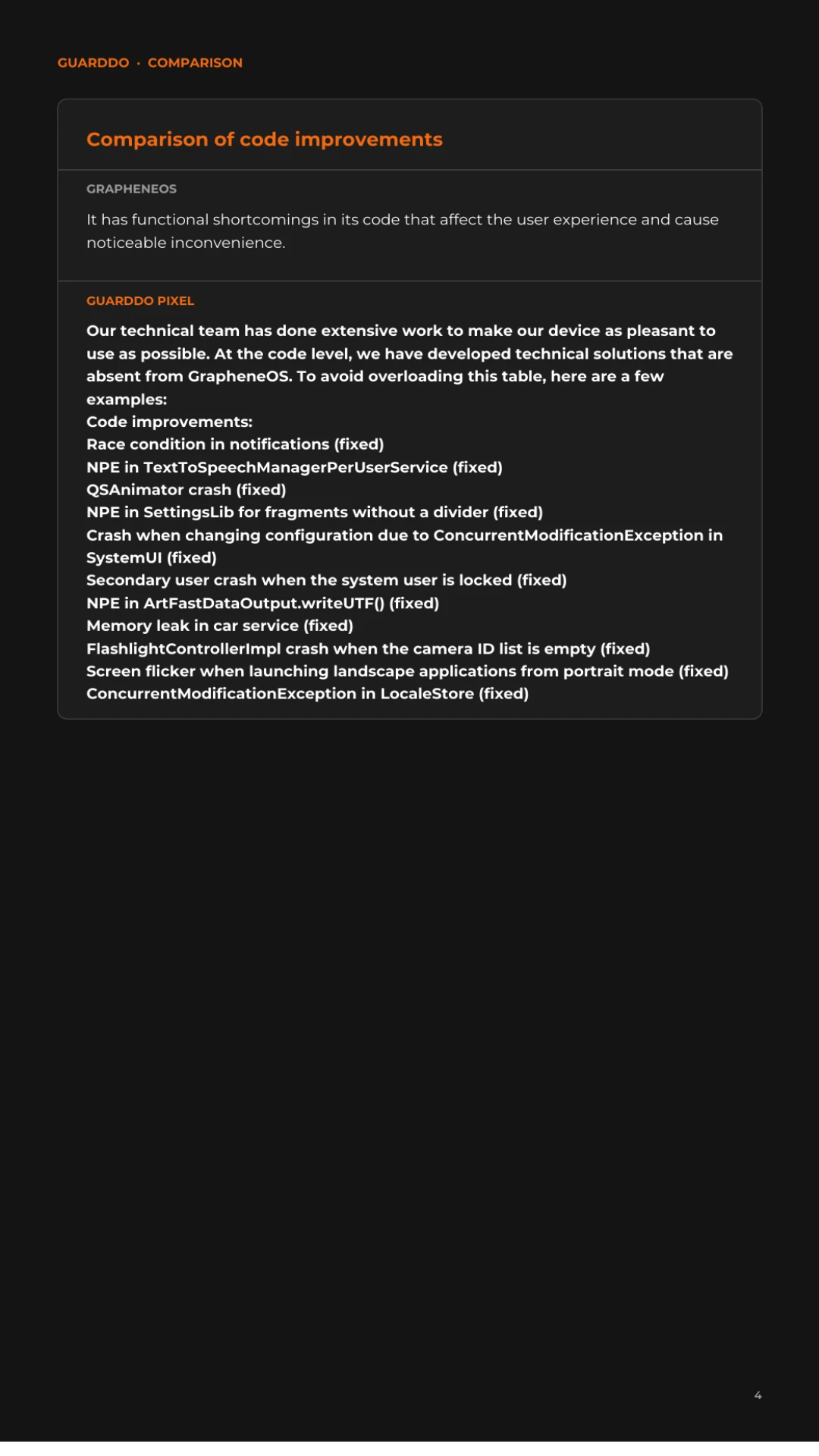
Security should not come at the expense of convenience. GrapheneOS has known functional shortcomings that affect the experience of everyday use.
Our technical team has worked extensively to make GuardDo Pixel as pleasant to use as possible. We developed code-level solutions that GrapheneOS does not have. Here are some examples of fixes:
- a race condition in notifications;
- an NPE in TextToSpeechManagerPerUserService;
- a QSAnimator crash;
- an NPE in SettingsLib for fragments without a divider;
- a SystemUI crash on configuration change (ConcurrentModificationException);
- a secondary-user crash when the system user is locked;
- an NPE in ArtFastDataOutput.writeUTF();
- a memory leak in car service;
- a FlashlightControllerImpl crash when the camera ID list is empty;
- screen flickering when launching landscape apps from portrait mode;
- a ConcurrentModificationException in LocaleStore.
The full list of changes is available in our open-source code.
11. Personal Support Instead of Forums
GrapheneOS does not offer dedicated personal support: questions are answered through documentation and the community.
GuardDo provides direct technical support from its team in English, Spanish, German, Russian, French, and Arabic. We help with initial setup, daily use, and any issues that arise, and we can configure custom functionality for each customer’s needs.
Who Should Choose GrapheneOS, and Who Should Choose GuardDo Pixel?
GrapheneOS is well suited to technically experienced users who are willing to sacrifice convenience for security and configure everything themselves.
GuardDo Pixel is made for people who need a turnkey secure smartphone: entrepreneurs, journalists, lawyers, executives, and anyone who values a hidden space, rapid data destruction in an emergency, protection against blocking and surveillance, and live support. We believe GuardDo Pixel is one of the strongest anonymity-focused solutions among custom smartphone operating systems.
Frequently Asked Questions
How is GuardDo Pixel different from GrapheneOS?
GuardDo Pixel is a ready-to-use secure smartphone based on Google Pixel and running GuardDoOS firmware. Unlike GrapheneOS, it has an undetectable hidden space, six emergency data-deletion scenarios, a built-in VPN with DPI bypass, SIM masking, an anonymous app store, and personal support.
Can the hidden space on GuardDo Pixel be detected?
No. The “gray” space does not appear in the interface or settings, and it can be opened directly from the lock screen with a separate password or fingerprint.
How can I delete data from GuardDo Pixel if the phone is seized?
You can send the phone an SMS with a predefined code phrase from any other number. Data can also be deleted with a special password or fingerprint, after repeated incorrect attempts, with the destruction button, after a period of inactivity, or when airplane mode is turned on.
Do I need a Google account on GuardDo Pixel?
No. GuardDo’s own anonymous store installs Android apps without linking them to a Google account, using anonymous tokens.
Does GuardDo Pixel have a VPN?
Yes. The firmware includes two VPN servers, DPI bypass, a secure Telegram proxy, and location spoofing for any city worldwide.
Is GuardDo Pixel’s source code open?
Yes. The source code is published on GitHub and GitLab, while the device changelog is published on the GuardDo website.
Can I use two SIM cards on GuardDo Pixel?
Yes. You can use two different SIM cards in two separate spaces, and SIM data is hidden from apps.
Has GuardDo Pixel undergone an independent audit?
Yes. GuardDo Pixel has undergone an independent security audit. Details will be published in a separate article.
Conclusion
GrapheneOS is a strong, security-focused operating system for people who are willing to configure everything themselves within the limits of what GrapheneOS allows. GuardDo Pixel goes further, turning a secure system into a ready-to-use tool for real-world threats: a hidden space that cannot be detected, several emergency data-destruction scenarios, built-in network protection, anonymous apps, and a team that helps at every step.
Still have questions about GuardDo Pixel? Contact us — we will help you choose the right configuration for your needs.